How to Get Your Whole Team Posting on LinkedIn (Without It Falling Apart in Week Three)
Most team LinkedIn programs die between week two and week six. Not for lack of motivation — for lack of system. Here is the playbook for getting a whole team posting and keeping them posting.
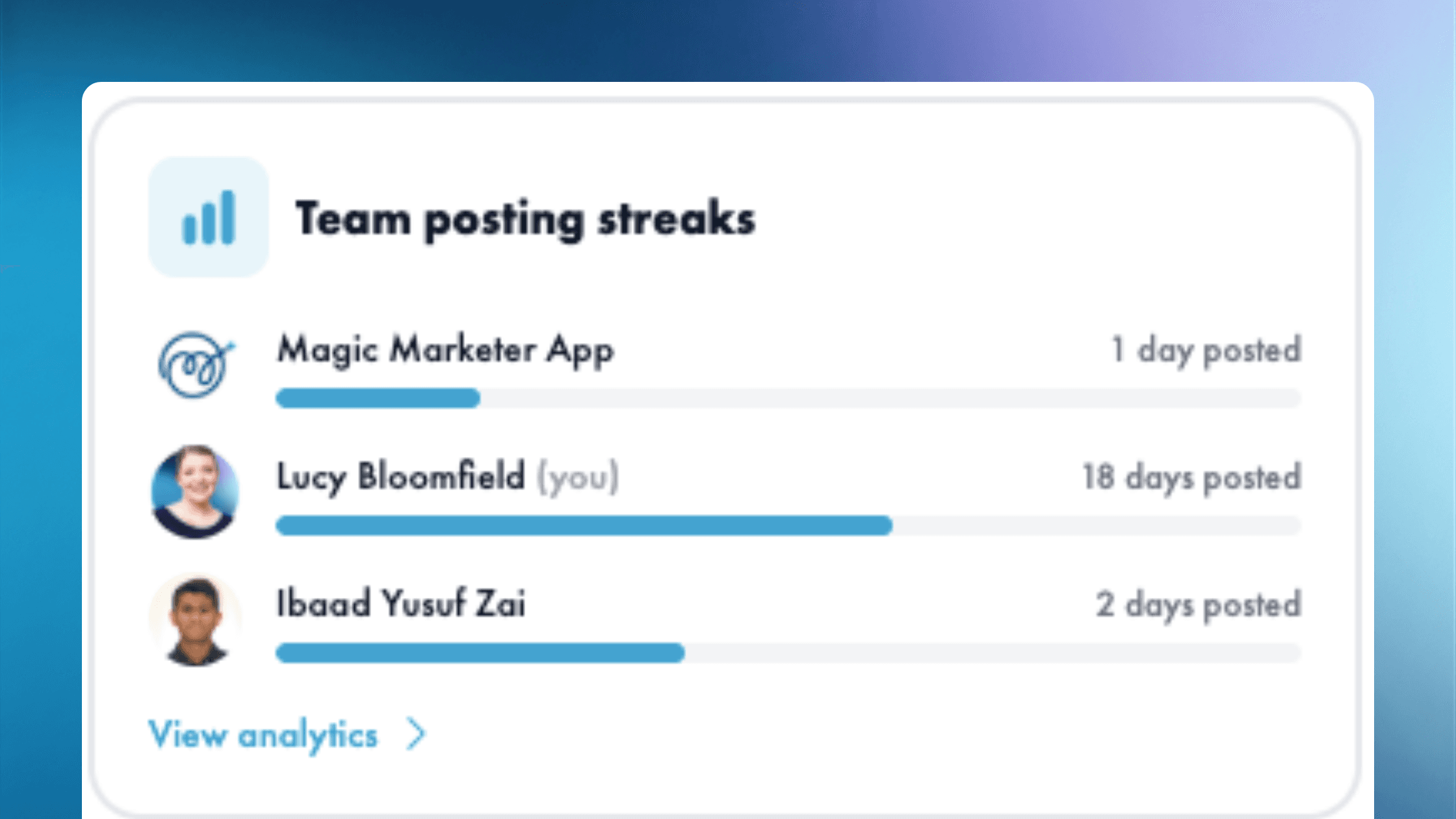
You announce the program at all-hands. Everyone nods. Week one is great — three people post, comments flow, you screenshot the engagement and pat yourself on the back.
Week two is okay. Two people post. The sales team forgets. Marketing is on it but solo.
Week three? Nothing. The Slack channel goes quiet. By week four the program is a graveyard. By week six you stop bringing it up because it's awkward.
Almost every team LinkedIn program follows this arc. Here is why, and the playbook that actually keeps a team posting past the honeymoon.
Why team LinkedIn programs die in week three
It is not motivation. The team genuinely wants to help. It is friction — and a few specific failure modes:
- No time. Posting is the lowest-priority thing on every person's calendar. The week's first emergency takes the slot.
- No ideas. "Post about your work" is not a brief. People stare at the page and bail.
- No template. Everyone's voice ends up sounding like the company blog, which means everyone hates how their posts feel.
- No feedback. They post once, get three likes, decide it's not for them, quietly retire.
- No visibility for the manager. You can't see who's posting, who's stuck, who needs a nudge. So you nudge no one.
Fix these in order and the program survives. Skip any of them and it doesn't.
The team LinkedIn playbook
1. Centralise drafts so no one starts from blank
The single biggest move: each team member should open Monday morning to drafts already written in their voice. Not a "post about something" Slack message. Actual drafts they can edit and ship.
Where those drafts come from — AI, a content brief, the marketing manager — matters less than the fact they exist. Friction collapses. The "I'll do it later" excuse evaporates.
2. Preserve each person's voice (especially sales and founder)
Nothing kills a LinkedIn program faster than every team member sounding like the brand newsletter. Buyers can smell it from three scrolls away, and your team can feel themselves doing it.
Give each role and each person a sense of what their angle is:
- Founder / CEO — vision, decisions, the "why we built this" thread
- Sales — patterns they see across deals, objections they hear weekly, the deals they're proud of
- Marketing — the campaign behind the scenes, the data, the strategy choices
- Customer / success — what your best users keep doing differently
- Ops / product — the inside story of how the thing actually gets built
One brand. Five voices. Each one credible because it is their actual job to know what they're talking about.
3. Lock a predictable rhythm
The single-most-effective frequency for a team program is the one the team can sustain. Sometimes that's daily. Usually it's three times a week. Occasionally it's once.
Pick the rhythm before week one. Make it the same days every week. Build it into the calendar. The goal is not volume — it is consistency that compounds. (More on choosing a cadence in How often should you post on LinkedIn?)
4. Give the manager visibility without becoming a bottleneck
If every post needs to go through you, your team's program is dead within the month — because you will become the bottleneck.
Build a workflow where you can see what's been drafted, what's been published, and what's stuck — but where team members can publish without waiting for you. Approve in batches, not in real time. Trust the voices you hired.
5. Cross-pollinate posts across the team
Sales people see things marketing doesn't. Product sees things customer success misses. Once a week, share what each function is posting about — the patterns inform the next round of drafts. The program becomes a flywheel instead of five parallel monologues.
How to actually approve and review at scale
Reviewing five people's drafts every week sounds like a part-time job. It isn't, if you set it up right:
- Approve in batches. Block 20 minutes on Monday afternoon. Read, tweak, approve.
- Approve the voice, not the wording. If it sounds like the person and lands the point, ship it. Don't perfect-edit it into corporate.
- Use one tool to see everything. Switching between LinkedIn drafts, Slack DMs, and Google Docs is how managers burn out.
The shortcut: Magic Marketer App for teams
This entire playbook is what we built Magic Marketer App Version Four — "All Hands" for.
You connect your team's LinkedIn profiles once. The app drafts a week of posts in each person's voice on Monday morning. Every teammate opens their inbox to ready-to-review drafts, edits in minutes, and ships. The manager sees every draft, every publish, every gap — in one dashboard. Approvals can happen in batches. Voices stay distinct. The program doesn't die in week three.
If you've been trying to get your team posting and the program keeps stalling, this is where to start.
Get started
The hardest part is week three. The system above is built to get you to week thirteen.
If you want the shortcut, book a walkthrough of Magic Marketer App for teams and we'll show you exactly how the All Hands flow works for your team's size and shape.

Ready to show up consistently?
Daily content for every person on your team — without the blank screen.










Pay monthly. Custom invoicing available for large teams.

About the author
Hello, I'm Lucy Bloomfield — Founder of Magic Marketer
I built Magic Marketer for experts who have something to say but don't want to stare at a blank screen. You've got the experience and the stories; you just need one clear idea a day and a simple way to show up.
My mission is to help 100,000 professionals build visibility and credibility — without turning content into a second job. One decision. Daily results.